
Field work
Keep equipment preserved until handover
Set up routines for rotating, energising and inspecting stored or installed equipment, and record each check on site.
- 1
Open Preservation
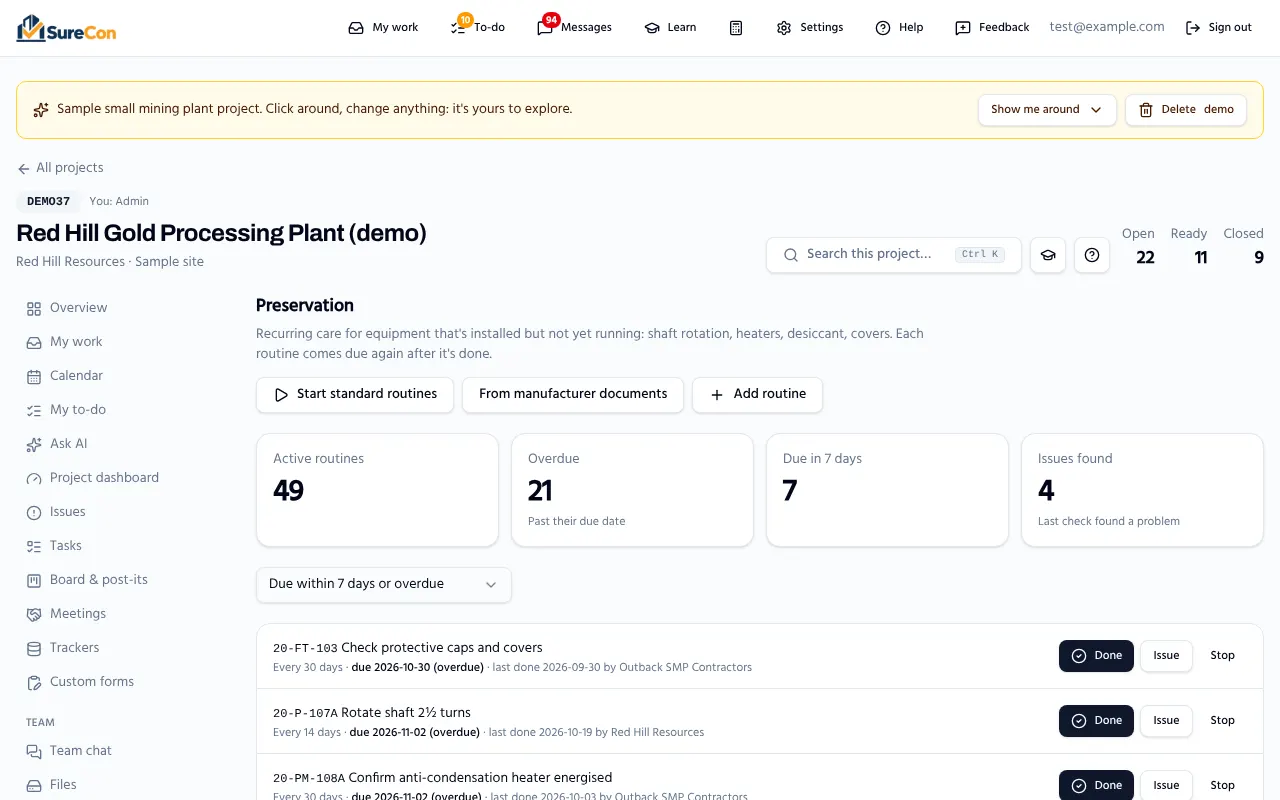
Completions → Preservation in the project menu. The top row shows active routines, how many are due in 7 days, overdue, and with issues.
- 2
Add a routine
Add routine, then pick the tag, describe the activity (for example 'Rotate shaft 1¼ turns' or 'Check heater is energised'), set Every (days) and the first due date.
- 3
Record a check
On site, find the routine and tap Done for a clear check, or Issue, describe what was found and tap Record. Either way the next due date moves on by itself.
- 4
Deal with issues
A routine whose last check found a problem stays flagged under With issues until a later check is clear. Raise a punch item if work is needed.
- 5
Stop and restart
Stop a routine when the equipment is commissioned or handed over; Restart it if the equipment goes back into storage.