
Tools
Keep manufacturer documents and IOM manuals in one place
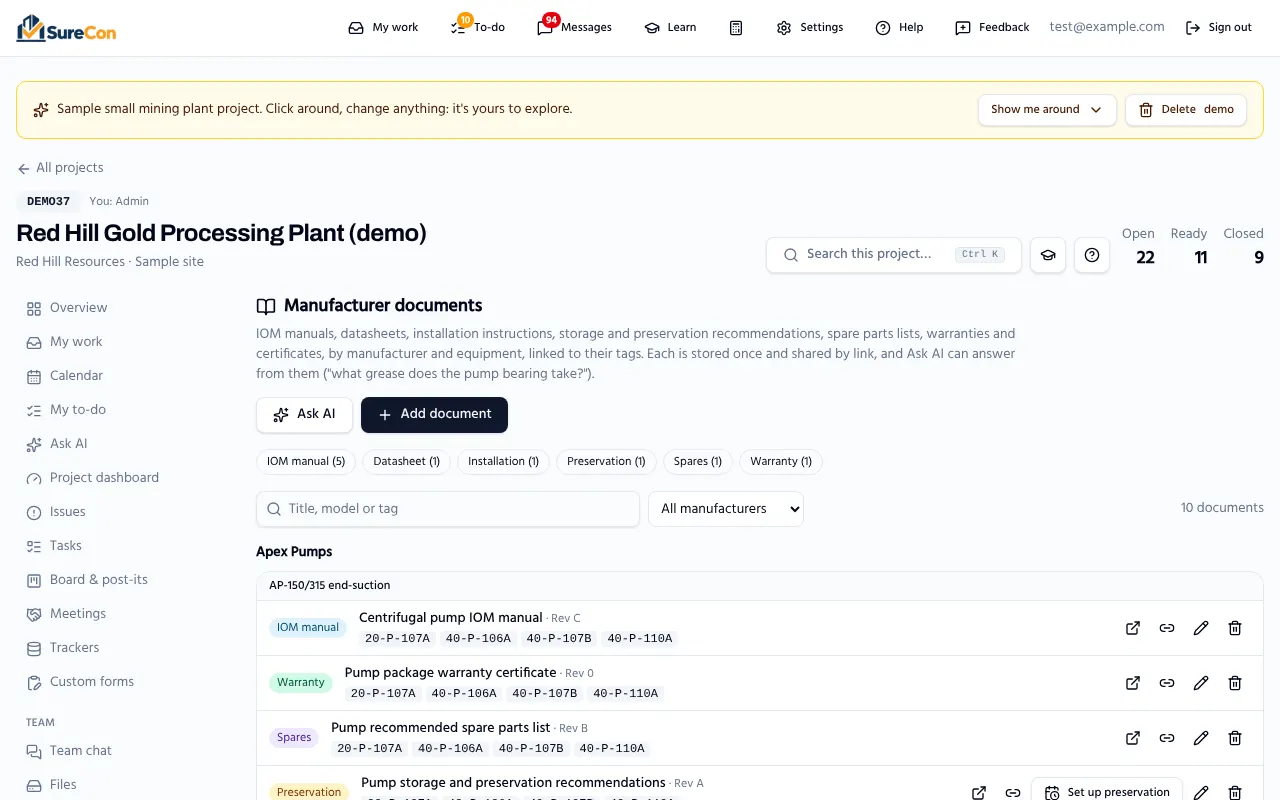
Store IOMs, datasheets, preservation recommendations, spares lists and warranties by manufacturer and equipment, linked to tags.
- 1
Add a document
Manufacturer docs & IOMs → Add document. Pick the type (IOM manual, datasheet, installation instructions, storage and preservation recommendations, spare parts list, warranty, certificates, vendor drawings, software), the manufacturer and the equipment or model.
- 2
Link the tags
Tags mentioned in the document are linked automatically; add any others in Tags it covers. The document then shows on each tag's page.
- 3
Find it
Documents are grouped by manufacturer and model. Filter by type or manufacturer, or search by title, model or tag. They also show in All documents.
- 4
Ask AI
Ask AI reads manufacturer documents, so you can ask for a bolt torque, a grease, a preservation interval or a test value and get the answer with the source.
- 5
Share and update
Share a link rather than the file, so everyone opens the one copy. Upload a new revision from the Knowledge library; the old one stays in the history.
- 6
Set up preservation
On a storage and preservation recommendations document, Set up preservation reads its routines and intervals (monthly shaft rotation, desiccant checks, regreasing) and adds them to the tags it covers. Each routine names the document it came from; ones already there are skipped.