
Quality
Construction quality software: a complete guide for QA/QC teams
What construction quality software does, the features that matter (ITPs, inspections, NCRs, punch lists, check sheets), the KPIs to track, how to choose a tool and how to roll it out.
· 12 min read
Quality on a construction project is decided in thousands of small moments: a weld inspected before it's painted over, a cable tested before it's energised, a pump aligned before it's grouted. Each one should leave a record. When those records live in binders, spreadsheets and inboxes, quality becomes something you prove at the end, in a hurry, instead of something you manage as the work happens. Construction quality software exists to close that gap.
This guide is for QA/QC managers, quality engineers, inspectors and project managers who are choosing a tool or replacing a spreadsheet. It covers what the software does, which features matter, how to measure quality, how to choose and how to roll it out without losing the crew.
What is construction quality software?
Construction quality software is a system for planning, recording and proving the quality of built work. It holds the inspection and test plans (ITPs) that say what must be checked, the inspections and test records that show it was, the nonconformance reports (NCRs) raised when something wasn't right, and the punch items that track what's left to fix. Done well, every record is tied to the thing it's about (a tag, a system, an area or a drawing), so the evidence for any part of the project can be pulled up in seconds.
It sits between two other kinds of tool. Project management software plans time and money; it rarely understands hold points or test records. Document management software stores files; it doesn't know which inspection a file proves. Quality software connects the plan, the inspection, the defect and the record, and that connection is what makes handover fast.
Why spreadsheets and paper stop working
- Hold points get missed. Nobody is told that the next activity can't start until the client has witnessed the test.
- NCRs stall. A register in Excel can't chase anyone, so corrective actions sit open for months.
- Evidence goes missing. Photos stay in phones, signed sheets get lost, and the turnover dossier is rebuilt from memory.
- There are several versions of the truth. The contractor's punch list and the client's punch list never quite agree.
- Trends stay hidden. Repeat defects by the same crew or supplier only show up when someone has time to analyse them, which is never.
If quality depends on one person remembering to look at a spreadsheet, it isn't a system. It's a hope.
The quality loop the software should support
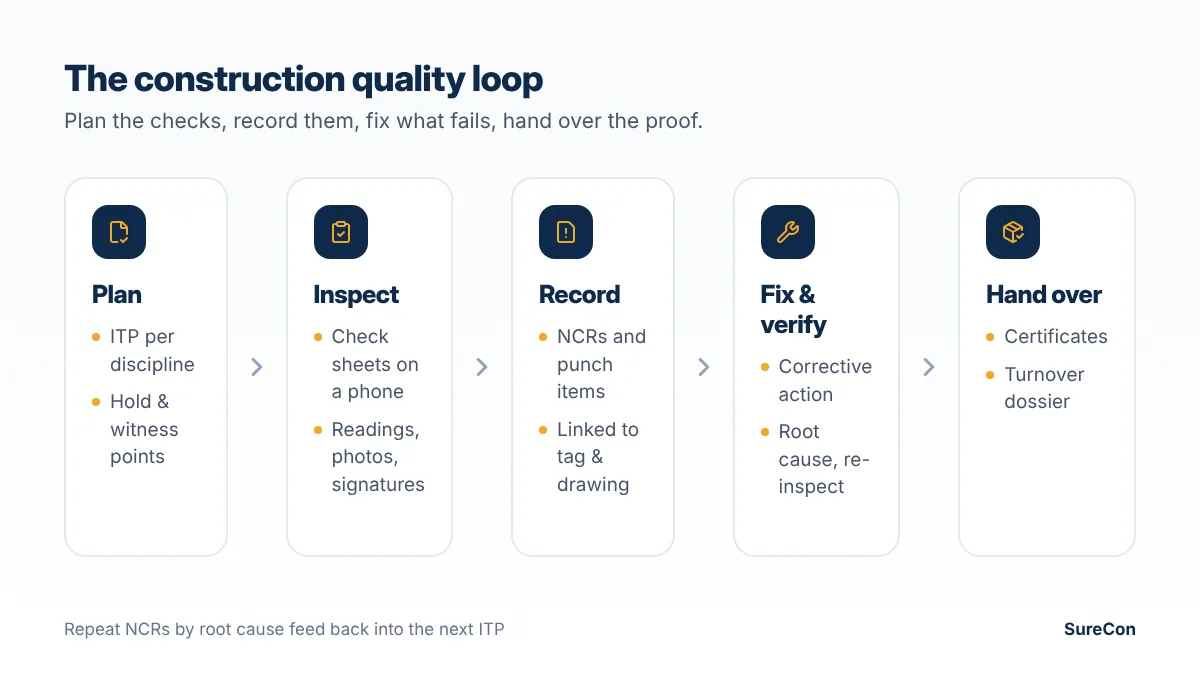
Most construction quality management follows the same loop, whatever the industry or standard. Plan the checks, carry them out, record what fails, fix it, verify the fix, learn from the pattern, and hand over the evidence. Good software makes each step quick and makes skipping a step hard.
Core features to look for
These are the features that do the work on a real project. A tool that does them well beats one that does fifty other things.
1. Inspection and test plans (ITPs) with hold and witness points
The ITP is the backbone. Look for ITPs that are structured (activities, acceptance criteria, references, who inspects) rather than attached PDFs, with hold and witness points that actually stop or notify. When an activity reaches a hold point, the right people should be told, and the next step should wait until it's released. Approving an ITP should create the inspection records for every matching tag automatically, so nobody has to set them up by hand.
2. Inspections and test records on a phone
Inspectors work at the equipment, not at a desk. Inspections, check sheets and inspection and test records (ITRs) should be filled in on a phone or tablet, with readings checked against limits as they're typed, photos attached, and the person and time recorded automatically. Offline working is not optional: basements, tunnels, remote sites and steel structures all kill signal.
3. Nonconformance reports (NCRs) with corrective action
An NCR needs a clear workflow: raised, disposition proposed (use as is, repair, rework, reject), disposition approved, corrective action, verified, closed. The software should assign each step to a person, chase due dates and record root cause, so you can see whether the same problem keeps coming back. Link each NCR to the tag, drawing, weld or material it concerns.
4. Punch lists that close
Punch items are the most numerous quality records on any project. They need categories (A must be fixed before mechanical completion, B before handover, C can be done later), a responsible company, photos, and a simple path from open to ready to closed. Contractors should see and act on their own items without seeing everyone else's, and raising an item should take seconds, by typing, speaking or taking a photo.
5. Document control and submittal review
Inspectors must work to the current revision. Quality software should either include document control or connect to it, so the latest drawing opens by default, superseded revisions are clearly marked, and submittals (method statements, material approvals, test procedures) are reviewed against the specification with comments tracked to closure.
6. Traceability: materials, welds, calibration
On piping, structural and pressure work, traceability is a requirement, not a nice-to-have. Look for weld maps (welder, procedure, NDE result per joint), material certificates linked to what they were used in, and calibration due dates for test equipment, so a test done with an out-of-date gauge is caught before the client finds it.
7. Audits and surveillance
Quality audits and surveillance visits check that the system itself is working: are ITPs followed, are records complete, are corrective actions effective? Checklists, scores and findings that turn into actions keep audits from becoming a report nobody reads.
8. Dashboards and reports people actually read
Reports should be built from the records, not typed up from them. A weekly quality report, an NCR register, punch status by company and inspection backlog by discipline should all be a click away, and ideally emailed automatically to the people who need them.
9. Handover and the turnover dossier
Everything above should roll up into certificates (mechanical completion, ready for commissioning, ready for start-up, handover) that check their own prerequisites, and into a turnover dossier that's ready when the work is, rather than a month of collation at the end.
Quality KPIs worth tracking
- First-time pass rate: the share of inspections passed at the first attempt, by discipline and company.
- Open NCRs and average days to close, with the oldest ones named.
- Repeat NCRs by root cause, crew, supplier or material: the best predictor of future problems.
- Hold point compliance: work that went past a hold point without release should be zero.
- Punch items open by category and company, and how many closed this week.
- Inspection backlog: requested inspections not yet done, and how long they've waited.
- Records complete per system: signed check sheets against expected, before each milestone.
Pick four or five and review them weekly. A KPI that nobody discusses is just decoration.
How to choose construction quality software
- Built for construction quality: ITPs, hold points, NCR workflows and check sheets out of the box, not a generic form builder you have to configure for months.
- Organised around your project structure: systems, subsystems, tags, areas and drawings, so evidence is found by asset.
- Works in the field: phone and tablet first, offline, with the camera and voice input.
- Cheap enough for everyone: if subcontractors and third-party inspectors can't have access, you'll be back to email and spreadsheets.
- Configurable without a developer: your workflows, fields, categories and roles.
- Proper records: full history of who did what and when, e-signatures, and exports you can keep.
- Connects to the rest: Excel import and export, an API, and links to scheduling and document tools.
- Secure: role-based access checked on the server, two-step sign-in, and clear answers about where data is stored.
Ask every vendor to show a hold point being released, an NCR going from raised to closed, and a turnover dossier being produced, on a phone, with your data. Demos of dashboards prove very little.
Supporting ISO 9001 and client quality requirements
Most client quality requirements are built on ISO 9001. Software doesn't make you compliant, but it makes the evidence easy to produce. The clauses that matter most on site map neatly onto the features above: control of documented information (7.5) is document control and record keeping; release of products and services (8.6) is your inspections, hold points and certificates; control of nonconforming outputs (8.7) and nonconformity and corrective action (10.2) are your NCR workflow. When an auditor asks for evidence, you should be able to show it from the system in minutes.
Rolling it out without losing the crew
- Week 1: set up the project structure (systems, subsystems, tags) and import the registers you already have.
- Week 2: load the ITPs and check sheet templates for one discipline and run them on one area.
- Week 3: move the punch list over and give contractors access to their own items.
- Week 4: switch NCRs over, set due dates, and start the weekly quality report.
- Then: add disciplines one at a time, retire the spreadsheets, and review the KPIs every week.
Start with the process that hurts most, make it easier than the old way on day one, and switch the paper version off once the new one works. Train on site, at the equipment, not in a meeting room.
Common mistakes
- Buying for the office instead of the field. If inspectors can't use it with gloves on and no signal, they won't.
- Leaving contractors out. Quality is mostly done by contractors; they need to see and close their own items.
- Configuring everything before going live. Start with standard templates and adjust as you learn.
- Treating the dossier as a final step. Build it continuously, or you'll rebuild it at the end.
- Measuring everything. A few KPIs reviewed weekly beat a wall of charts.
Where SureCon fits
SureCon is free construction quality and completions software. It covers ITPs with hold and witness points, inspections and surveillance, NCRs with corrective action, punch lists, check sheets on a phone that work offline, document control and submittal review against the specification, weld maps and test packs, quality audits, dashboards, scheduled reports and certificates from mechanical completion to handover, all tied to your systems and tags. Contractors, inspectors and the client can all use it at no cost.
The quickest way to judge it is to open a sample project, raise an NCR, release a hold point and generate a turnover package. Then import your own registers and try it on one area.