
Start here
Work faster: grid editing, punch from a photo, AI change summaries and starter packs
Edit many punch items at once, raise items from a photo, see what changed on a drawing, and start projects pre-set for your industry.
- 1
Edit as a grid
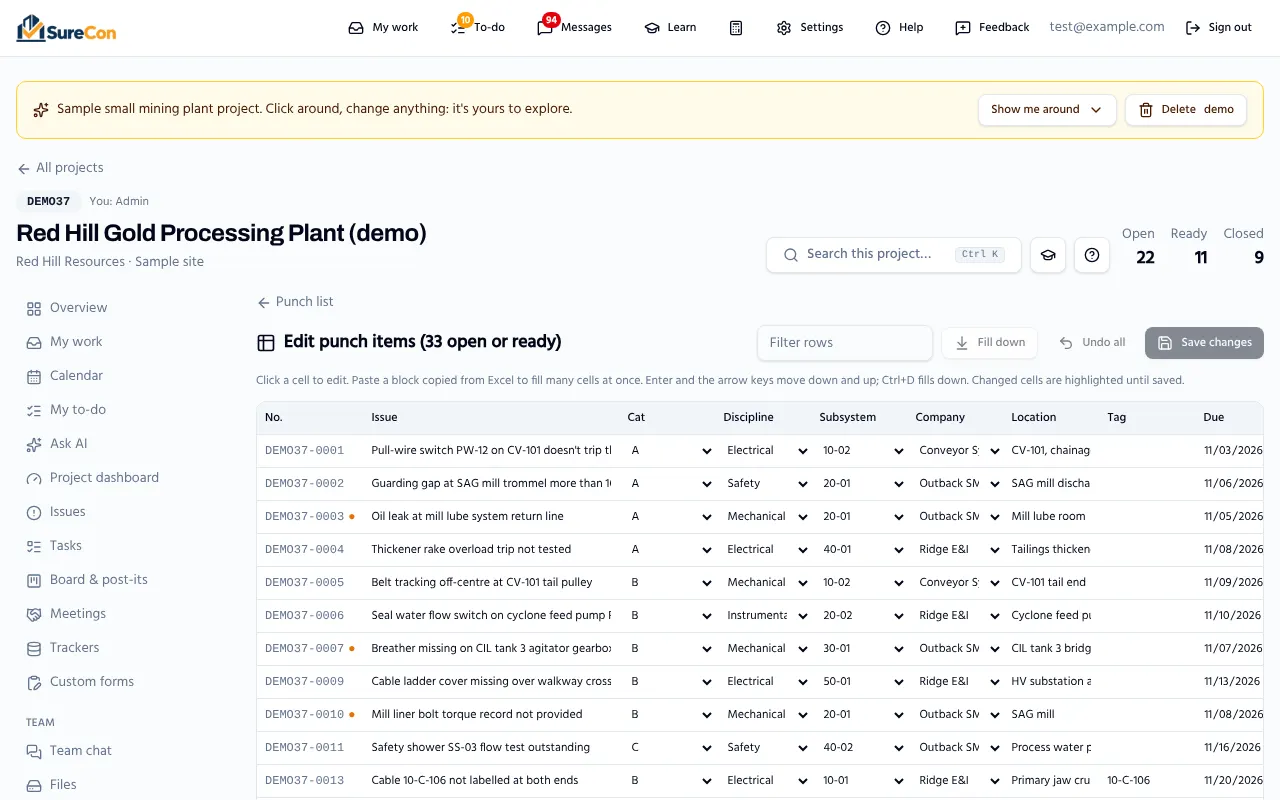
Punch list → Edit as grid (admins and inspectors). Change cells directly, paste a block copied from Excel, use Fill down (Ctrl+D) to copy a value to every row below, then Save. Each item keeps its history.
- 2
Raise a punch from a photo
In New punch, tap From a photo and take a picture of the defect. AI describes it and fills in the title, category, discipline and location, and the photo is attached. Check it before saving.
- 3
What changed on a drawing
On a drawing, Compare with an earlier revision, then Summarise the changes (AI) for a plain-language list of what was added, removed or changed on the sheet.
- 4
Install the app
Settings → Install the app (or the strip at the top on a phone). On iPhone: Share → Add to Home Screen. It opens full screen and works without signal.
- 5
Start with a starter pack
New project → Starter pack: oil, gas & LNG, mining, data centres, power & renewables, water, or buildings & MEP. You get a system and subsystem breakdown to edit, the modules that industry uses and progress weights.