
Tools
Use the project calendar
See inspections, walkdowns, meetings, tests and due dates in one place, and plan events.
- 1
Open Calendar
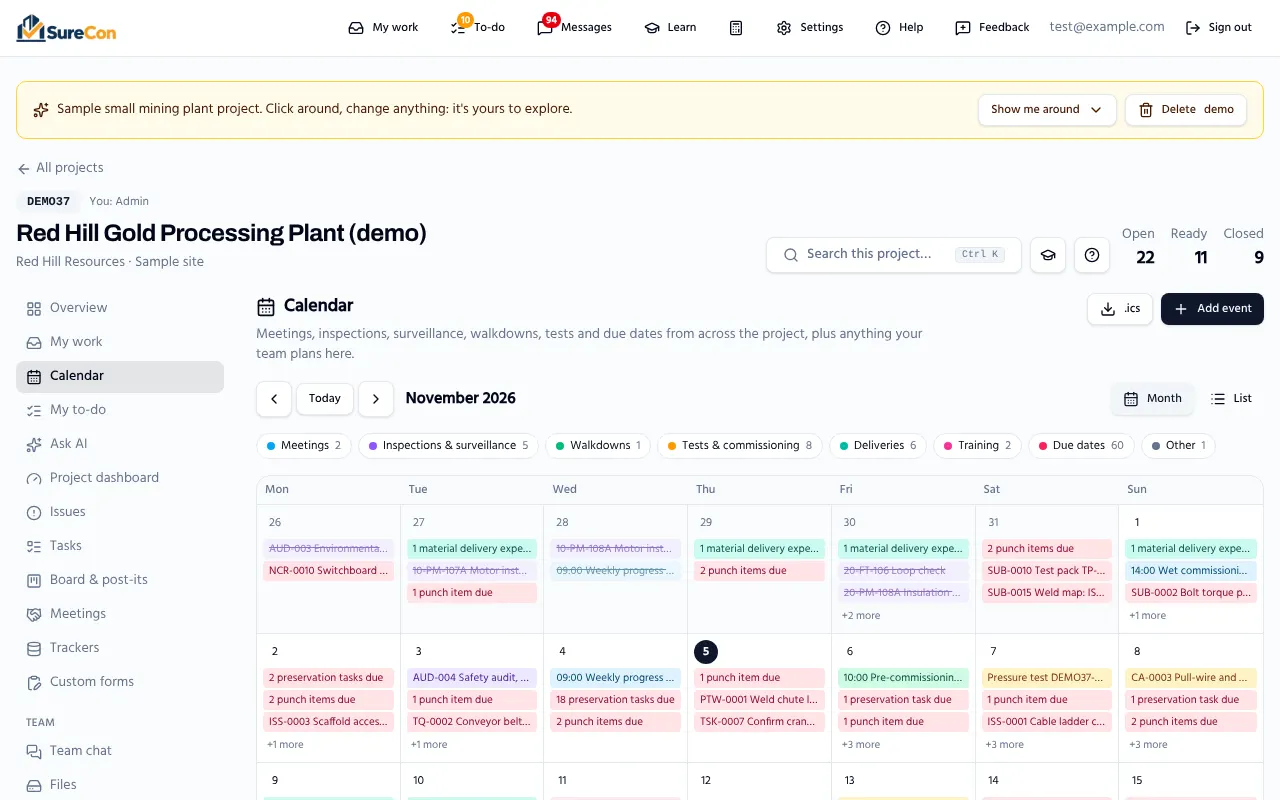
Calendar is near the top of the project menu. It shows the month, with today highlighted. On a phone it shows as a list of days.
- 2
See what's on
Meetings, ITP inspection requests, surveillance, walkdowns, commissioning activities, deliveries, training and due dates (NCRs, technical queries, reviews, meeting actions, permits and punch items) appear automatically from their modules.
- 3
Filter
Use the coloured buttons to show or hide each type. Click a day to list everything on it, or click an item to open it.
- 4
Plan an event
Add event (or the + on a day) plans a walkdown, inspection, FAT/SAT, delivery, training, shutdown or anything else. Leave the time blank for all day; set Until for several days.
- 5
Add it to your own calendar
The .ics button downloads the month's events, filtered as you see them, for Outlook, Google Calendar or Apple Calendar.