
Handover
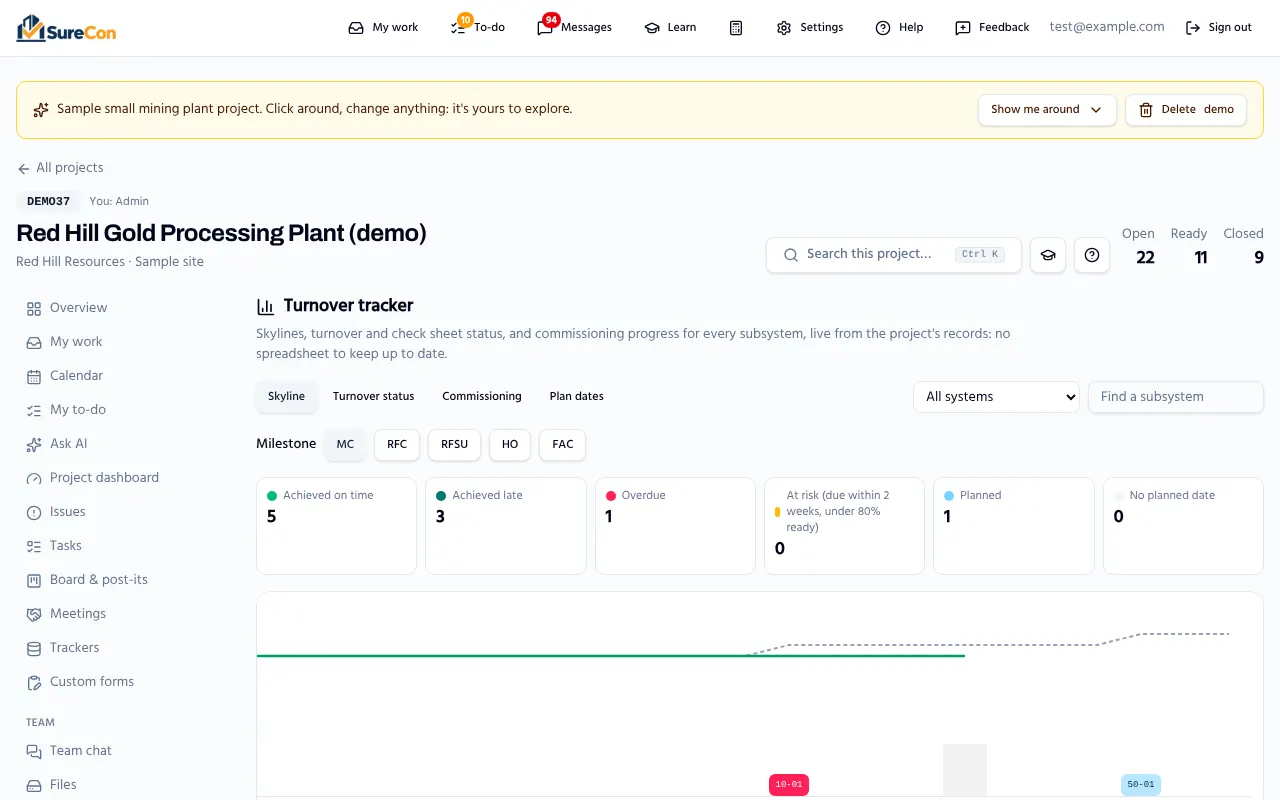
Track turnover with skylines
Plan milestone dates, then follow skylines, check sheet status and commissioning progress live.
- 1
Plan the milestones
Turnover tracker → Plan dates. Enter planned MC, RFC, RFSU, HO and FAC dates per subsystem, or paste them from your schedule (code, then the dates; 2026-12-01 or 01/12/2026).
- 2
Read the skyline
Pick a milestone. Each subsystem is a block in its planned week: green achieved on time, dark teal achieved late, red overdue, amber due within two weeks and under 80% ready, blue planned. The lines compare cumulative planned with achieved.
- 3
Check turnover status
Turnover status lists every subsystem's A, B and C check sheets, open punch items by category, and each certificate's status and dates. A red ring means it's past its plan. Excel exports the lot.
- 4
Follow commissioning
Commissioning shows B and C check sheets and commissioning activities by type for each subsystem, with RFSU status. Add activities under Commissioning in the menu, linked to a subsystem.