Industries
Completions at remote sites: working when there's no signal
Mines, pipelines, wind farms and offshore modules rarely have good coverage. How to keep punch lists and site records flowing when the network doesn't reach the work face.
· 5 min read
The work that most needs recording often happens furthest from a signal: in a mine's processing plant, at the far end of a pipeline spread, inside a concrete structure, or on a module in a fabrication yard. If the tool needs a connection, crews go back to paper, and someone types it all up later. Some of it never gets typed up.
What has to work offline
- Raising punch items, with photos, as you find them.
- Opening the pages you need: the walkdown, the punch list, the drawings you looked at.
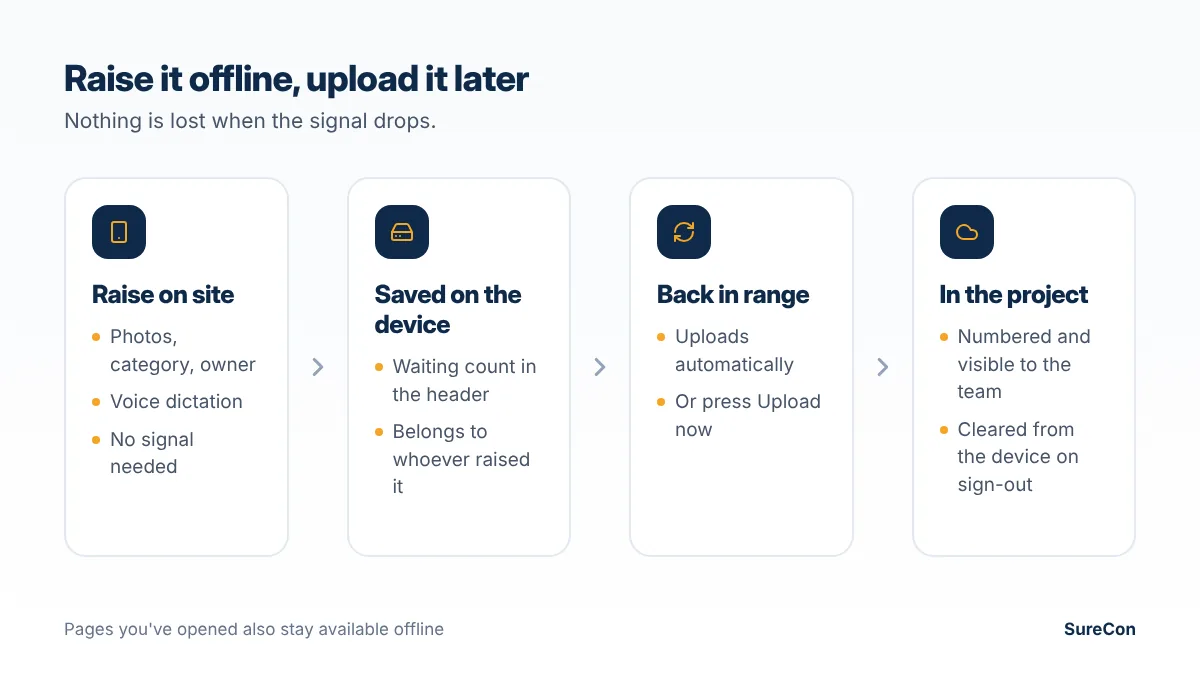
- Knowing what's still waiting to upload, so nothing is lost.
- Uploading automatically when the connection comes back.
Shared devices and security
Remote crews often share tablets. Offline data must belong to the person who captured it, and must disappear from the device when they sign out, so the next person can't see it.
How SureCon does it
Install SureCon on a phone or tablet like an app. Punches raised without signal, photos included, are saved on the device and upload by themselves when the connection returns. The header shows how many are waiting. Pages you've opened stay available offline, and everything saved is cleared on sign-out. Voice dictation means gloved hands aren't a problem.