
Tools
Assign work and run a task board
Give tasks and to-dos to each other, move them across a Kanban board, and share post-its.
- 1
Open the board
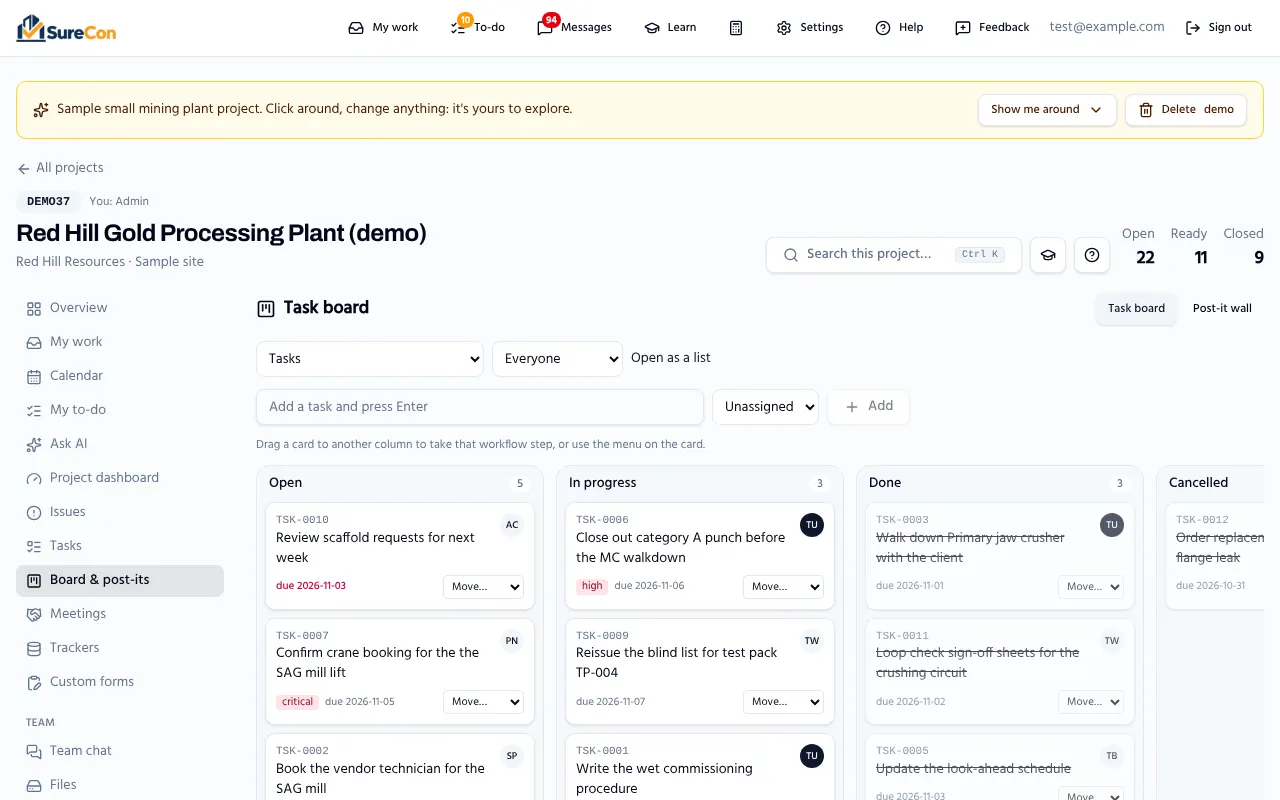
Board & post-its shows Tasks as a Kanban board, one column per status. Pick another register (issues, permits, a tracker) from the list to see it the same way.
- 2
Add and assign
Type a task, choose who does it and press Enter. The person gets a message and an email. Filter the board to Assigned to me, someone else, or Unassigned.
- 3
Move cards
Drag a card to another column, or use Move on the card. Each move is a workflow step, so it follows the same rules as the register: only the people allowed to take a step can, and steps that need a comment ask for one.
- 4
Give a to-do
My to-do → New to-do, pick the project and Who does it. It goes on their list with reminders; you follow it under Given to others and hear when it's done.
- 5
Post-it wall
Switch to Post-it wall to add notes, colour them and drag them around. It refreshes every few seconds, so the whole team works on the same wall.